RSM is committed to providing an environment that is accessible to individuals with disabilities. Have you encountered an accessibility problem? Or do you have a question or comment about accessibility? For example, have you found something that doesn't work as expected when using assistive technology or keyboard navigation? Please contact us via our accessibility contact form. The sooner we know, the sooner we can fix it.
Please include:
What can you expect from us?
If you are not satisfied with how your complaint was handled or if we did not respond in time, then you can contact us via webservices@rsm.nl.
If you need content in an alternative format such as:
please contact us via our accessibility contact form.
Please specify what content you need and what format would work best for you.
Our website aims to conform to the Web Content Accessibility Guidelines (WCAG) 2.1 Level AA standard. This is the internationally recognised benchmark for web accessibility.
We conducted a comprehensive accessibility audit in February 2025 to identify areas for improvement and we are continuing to identify and resolve issues. We are actively working to resolve identified issues. Our accessibility commitment includes:
Known issues we're working on
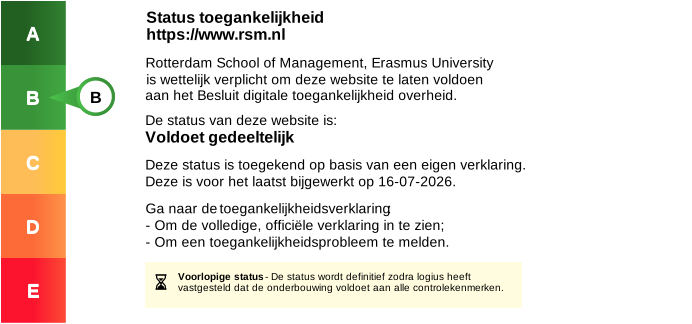
For the most current accessibility status, see our full accessibility audit report conducted by Swink, February 2025.
Rotterdam School of Management, Erasmus University (RSM) is located on the Erasmus University campus at Woudestein. If you need information about accessibility facilities and support services on campus, including physical accessibility, accessible transport, accessible facilities, disability services and academic accommodations, visit the Erasmus University accessibility page.
This page provides comprehensive information about accessibility support and facilities available to all students and visitors at Erasmus University, including those studying or working at RSM.
Our website development follows these accessibility guidelines:
Website technology:
PDF accessibility:
Documents on our website are provided in accessible PDF format where possible. If you have difficulty accessing a PDF, please contact us via our accessibility contact form and we can provide the content in an alternative format.
High contrast mode
Click the "Click to set high contrast" button in the header to increase contrast across the website. This helps visitors with low vision or colour blindness.
Skip to content
A "Skip to content" link appears when you press Tab on any page, allowing keyboard users to bypass the navigation menu and go directly to the main content.
Accessible contact form
If you encounter barriers when accessing content or using features on our website, please use our accessibility contact form to let us know. We take your feedback seriously and will respond within five business days.
All functionality on rsm.nl can be accessed and operated using a keyboard alone. Here's how:
| Key or shortcut | Action |
|---|---|
| Tab | Move focus to the next interactive element |
| Shift and Tab | Move focus to the previous interactive element |
| Enter or Space | Activate a button or link |
| Arrow keys | Navigate within menus, tabs, sliders and dropdown lists |
| Escape | Close open menus or dialogues |
| Home and End | Jump to the beginning or end of a list (depending on context) |
Using the main menu using your keyboard
Search using your keyboard
Forms
Programme finder and other interactive tools
Focus indicator
When you Tab through the page, you'll see a visual indicator (usually a coloured border) showing which element on the page is active and waiting for your keyboard commands.
Our website is tested and compatible with common assistive technologies used worldwide. This includes screen readers, speech recognition software, magnification tools and voice-to-text applications.
We regularly test rsm.nl with the following screen readers:
JAWS (Windows)
NVDA (free, Windows)
VoiceOver (Mac, iOS)
TalkBack (Android)
Speech recognition
Magnification software
Captions and transcripts